Why Your Amazon Ads Are Getting Clicks but No Book Sales
Sponsored Products clicks mean a shopper chose to visit the page, not that the sale was inevitable.
Every paid click that does not turn into a sale feels like Amazon has charged you for a buyer who changed their mind.
That makes Amazon ads getting clicks but no book sales one of the easiest KDP problems to misdiagnose. The instinct is to blame the campaign: lower the bids, add negatives, switch match types, create more ads or simply spend more until something works.
But the click itself tells you something useful. The shopper saw enough relevance to open the book. From that point, only two broad explanations remain: the wrong person clicked, or the right person clicked and the product page lost them.
Those are completely different problems. One needs better traffic. The other needs better conversion. The expensive mistake is buying more clicks before you know which one you have.
The Quick Answer: Clicks Mean Interest, Not Conviction
If your Amazon ads are getting clicks but no book sales, split the problem in two before touching the campaign:
- The wrong people are clicking. Your targeting, keywords, categories, or product placements may be attracting shoppers who are not a strong match for your book.
- The right people are clicking, but the listing is not convincing them to buy. Your title, subtitle, description, price, reviews, cover, Look Inside sample, or buyer promise may be weakening conversion.
If the traffic is wrong, tighten the targeting. If the traffic is right but shoppers still leave, improve the listing. Increasing spend before you know which problem you have simply pays to repeat the same failure at a larger scale.
Why Paid Clicks With No Sales Hurt So Much
Organic traffic can disappoint without costing you anything directly. Paid traffic makes every weak conversion visible in pounds and pence. That is why a run of clicks without orders quickly creates panic.
Is It an Ad Problem or a Listing Problem?
Start with the pattern in the data. The same headline problem, clicks without sales, can begin at very different points in the buying path.
| What is happening? | Likely problem | Where to look first |
|---|---|---|
| Lots of impressions but very few clicks | The book is not earning attention in the ad placement. | Cover, title, subtitle, price, reviews, keyword match. |
| Clicks but no sales | Traffic quality or listing conversion problem. | Search terms, product page, description, price, Look Inside. |
| Clicks from broad keywords but no orders | Poor buyer intent. | Keyword relevance and search intent. |
| Clicks from relevant terms but no orders | Listing conversion issue. | Title, subtitle, description, reviews, price, sample pages. |
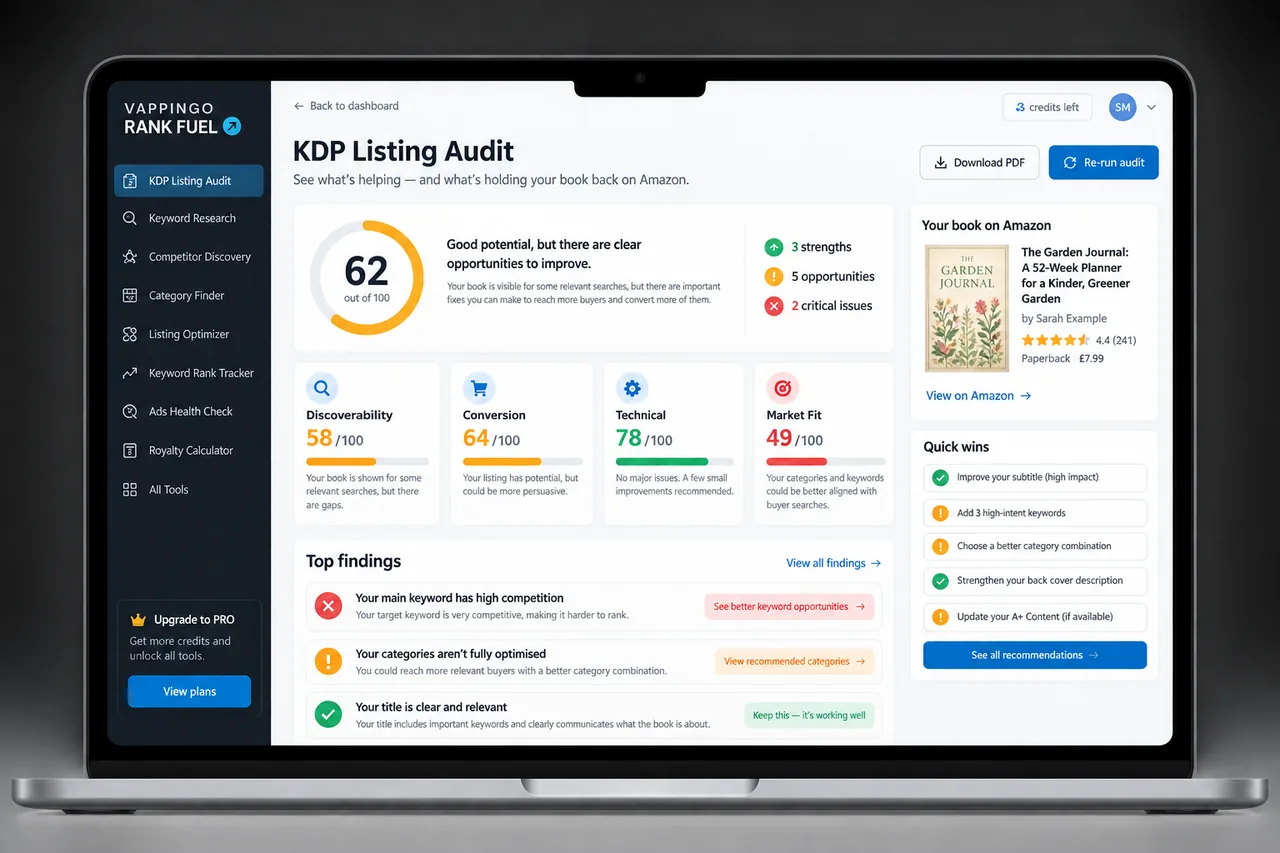
If your book is getting ad clicks but no sales, do not assume the solution is more traffic. You may need to fix the page those clicks are landing on. If you have not already done it, run the listing through a diagnostic before you increase the budget.
Ten Reasons Amazon Ads Get Clicks But No Book Sales
The ten causes below fall into two groups: the click should never have happened, or the click was relevant and the listing failed to convert it. Keep that distinction in view as you diagnose each one.
1. Your Ad Keywords Are Too Broad
Broad keywords can create reassuring activity while sending you shoppers with completely different intentions. A phrase such as math workbook can mean primary school practice, GCSE revision, homeschool work, exam preparation or mental arithmetic. If your book serves only one of those buyers, the other clicks are expensive noise.
2. The Search Intent Does Not Match Your Book
A search can be related to the subject and still be a poor commercial match. Someone searching for how to publish a book may want a free article or video, while someone searching for a self-publishing workbook for beginners is signaling a much more book-shaped need.
3. The Ad Promise and Listing Promise Do Not Match
The click creates an expectation. The listing has to confirm it immediately. If the ad is triggered by beginner-friendly and the page looks advanced, or the keyword says large print and the listing does not prove that promise quickly, the shopper has a reason to leave.
4. The Description Does Not Sell the Book
A paid click has already cleared the first hurdle. The description now needs to turn that interest into conviction. If it merely summarizes the contents, lists features or takes too long to reach the buyer’s problem, it may waste traffic that was actually well targeted.
- connect with the buyer’s reason for searching,
- explain who the book is for,
- show the outcome, benefit, or experience,
- turn features into reasons to buy,
- make the book feel specific and credible.
If your ads are getting clicks but no sales, the description is one of the first listing elements to review. For more help, read Why Your KDP Book Description Is Not Selling Your Book.
5. The Title and Subtitle Are Not Reinforcing the Click
The title and subtitle need to reassure the shopper that the click was sensible. A specific search creates a specific expectation, and vague, clever or cluttered metadata can weaken that match as soon as the product page opens.
6. The Price Creates Friction
Price is judged against the whole offer, not in isolation. If nearby books have more reviews, clearer value or stronger samples, your price can feel harder to justify even when it is perfectly reasonable on paper.
- Does my book look worth this price?
- Do competing books offer more obvious value?
- Do they have stronger proof or more reviews?
- Does my description explain the value clearly enough?
- Would the buyer understand why this book is the right choice?
Lowering the price can sometimes help. But if the listing is unclear, a lower price may simply make a weak offer cheaper.
7. The Review Count Is Working Against You
Ads can place a new book directly beside established titles. That gives you visibility, but it also exposes the proof gap. When your review count is lower, every other part of the listing has to reduce uncertainty more effectively.
8. The Look Inside Sample Is Losing the Sale
The ad dashboard cannot tell you that the shopper liked the listing and then disliked the sample. Look Inside can be the hidden leak when the interior feels thinner, less clear or less polished than the product page promised.
9. Competitors Look Like the Easier Choice
Your paid click does not remove the alternatives. The buyer can still compare your book with organic results, sponsored titles and product-page recommendations. If those books look clearer, safer or more relevant, your ad may simply help the shopper discover the competitor.
10. Your Campaign Structure Makes the Data Hard to Read
Sometimes the listing is not the main problem. A campaign that mixes broad discovery, exact terms, product targets and categories too loosely can make the data almost impossible to interpret. Useful clicks get buried inside poor-fit traffic and one expensive target can consume budget before better terms get a chance.
How to Diagnose Amazon Ads Clicks With No Sales
Use the table below before changing bids or increasing the budget. The aim is to identify whether click quality or product-page conversion is the first problem to solve.
| Symptom | Most likely issue | First fix |
|---|---|---|
| Broad keyword clicks, no sales | Poor buyer intent | Move budget toward more specific, better-matched terms. |
| Relevant keyword clicks, no sales | Listing conversion problem | Audit title, subtitle, description, price, proof, and Look Inside. |
| Clicks but shoppers leave quickly | Mismatch between ad/search intent and product page | Make the listing promise match the keyword promise. |
| High spend, scattered clicks, no clear winners | Messy campaign structure | Separate discovery, exact targeting, and product targeting. |
| Good click-through, poor sales | Product page is not closing the sale | Improve description, proof, value, sample, and competitive positioning. |
What to Fix First
Do not change everything at once. Work from the click backward and forward until you know whether the failure begins with the traffic or after the shopper reaches the page.
Step 1: Check the actual search terms
Do not judge the campaign only by the keyword you targeted. Look at the search terms and placements that actually generated clicks. Would a shopper using that phrase reasonably expect a book like yours?
Step 2: Separate poor traffic from poor conversion
If the search terms are wrong, fix the targeting. If the search terms are right, stop blaming the ad and investigate the listing. The diagnosis determines the next move.
Step 3: Audit the landing page
Your Amazon product page is the landing page. The cover, title, subtitle, description, price, reviews and sample all need to support the same promise that earned the click.
Step 4: Compare against the books buyers see beside yours
Paid visibility does not remove competition. Compare the books the shopper can see in the same session and ask whether another option communicates the value faster or carries more trust.
Step 5: Make one focused change at a time
Change the targeting, listing copy, price or campaign structure deliberately and record the date. If everything moves at once, the next week’s data cannot tell you what solved the problem.
The “Would This Click Feel Obvious?” Test
Take one search term that generated a paid click, then open the product page as if you were the shopper.
Would someone who searched that phrase immediately feel this book is exactly what they were looking for?
If the answer is no, the traffic may be wrong. If the answer is yes and sales still do not follow, the page may not be persuasive enough to close the decision.
Which Rank Fuel Tools Fit This Problem?
Use the tool that answers the next decision. The most useful workflow keeps the ad evidence, listing diagnosis and next change attached to the same book rather than treating each tool as a separate exercise.
| Tool | Use it when… |
|---|---|
| Ads Weekly Coach | Use campaign reports to separate wasted traffic from conversion problems and decide what to change next. |
| Listing Audit | Check whether the product page is wasting relevant paid clicks. |
| Listing Optimizer | Strengthen editable live-listing copy and positioning before you scale a campaign. |
| Keyword Research | Check Amazon.com buyer intent and market evidence before increasing spend on a target. |
| Book Keyword Spy | Find Amazon searches already bringing visibility to relevant competing books. |
| Amazon Ads Generator | Build a cleaner campaign structure after the book, listing, and targeting strategy are ready. |
Frequently Asked Questions About Amazon Ads Clicks But No KDP Sales
Why are my Amazon ads getting clicks but no book sales?
Your Amazon ads may be getting clicks but no sales because the traffic is poorly targeted, the keywords are too broad, the listing does not match the search intent, the description is weak, the price creates friction, the book has limited reviews, or the Look Inside sample does not support the promise.
Does a click mean the shopper wanted my book?
No. A click means the shopper was interested enough to open the listing. It does not mean they were convinced. They may have realized the book was not the right format, level, topic, price, or quality once they reached the product page.
Should I pause Amazon ads if I get clicks but no sales?
You may need to pause or reduce spend on poor-performing campaigns, especially if clicks are coming from broad or irrelevant terms. But before stopping everything, diagnose whether the issue is traffic quality or listing conversion.
Should I lower my book price if ads are not converting?
Not automatically. Price may be part of the problem, but lowering it will not fix poor targeting, weak description copy, unclear positioning, bad search intent, or a Look Inside sample that does not support the sale. Compare your price with competitors before changing it.
Can a better book description improve Amazon ad results?
Yes. If the ad is bringing relevant shoppers to the page, a stronger description can help turn clicks into sales by clarifying the buyer promise, explaining the benefits, building trust, and making the book feel like the right choice.
What should I check before increasing my Amazon ads budget?
Before increasing your budget, check the search terms, keyword relevance, title, subtitle, cover, description, price, reviews, Look Inside sample, and competitor context. Do not scale traffic until the listing is ready to convert it.
How do I know if the problem is my ad or my listing?
If clicks are coming from irrelevant or broad search terms, the ad targeting is likely the first problem. If clicks are coming from relevant search terms but buyers still do not purchase, the listing is likely the first place to audit.
Final Thought: Do Not Keep Buying Clicks for a Page That Is Not Ready
If your Amazon ads are getting clicks but no book sales, do not assume the answer is a bigger budget. A click has already told you something useful: the shopper saw enough relevance to investigate.
Now find out why the decision stopped there. If the search term was wrong, tighten the traffic. If the search term was right, strengthen the page. If competitors make the choice easier, close that gap before paying for more visits.
Not sure whether the ads or the listing are the problem?Run your KDP Listing Audit before you increase the budget.