Are You Wasting Your 7 KDP Keyword Boxes?
KDP lets you use up to seven keyword fields, but repetition and vague phrases waste the opportunity. Build them around accurate buyer language instead of seven versions of the same topic.
Seven keyword boxes feel like seven chances to tell Amazon more about your book. They are also seven chances to say almost the same thing seven times.
Seven boxes filled. One search idea.
This looks like a complete backend keyword strategy:
If you are wondering whether you are wasting your 7 KDP keyword boxes, stop asking whether every field is full. Ask whether each one adds a useful, accurate buyer path that the title, subtitle and other boxes are not already carrying.
The boxes cannot manufacture demand or rescue a weak listing. What they can do is widen the number of relevant ways Amazon can connect the right shopper with the book. The ten mistakes below show where that hidden search space usually gets lost.
The Quick Answer: Your Keyword Boxes Should Cover Buyer Intent, Not Just Book Topics
The most useful way to think about the seven fields is coverage, not exact match. They are not seven isolated keyword slots where each box must equal one customer search. Use them to preserve important phrases in a natural order, then add closely related language that helps Amazon understand other relevant searches the book genuinely fits.
- phrases already covered in the title or subtitle
- single vague words
- broad phrases with weak buyer intent
- keywords that describe the topic but not the buyer’s search
- competitor-style phrases that do not match your book
- near-duplicate variations that use up space without adding much.
A strong backend, therefore, is not the one with seven completely different phrases or the one with the most characters used. It is the one that gives Amazon clear, accurate relevance signals without wasting space on padding, needless duplication, or search language the book cannot honestly support.
Your Seven KDP Boxes Are Not Seven Exact-Match Keywords
The useful lesson from Google search is not that Amazon uses Google’s algorithm. It is that relevance is bigger than mechanical repetition. Good search writing is specific, natural, and clearly about the thing the searcher actually wants. The same instinct helps with KDP metadata.
A single field can support more than one relevant search. A well-built field may preserve a strong phrase and then use the remaining characters for closely related words. The aim is to make the available space work harder without pretending that every possible permutation is guaranteed to be indexed.
This is also where character usage matters. Amazon does not require every field to be full, but Rank Fuel’s optimization strategy deliberately aims to use the available capacity. In the current optimizer, each box is targeted at roughly 45-50 characters; if a box is short, the system adds more relevant buyer-intent terms rather than leaving useful search space empty.
How the seven boxes can work together
Imagine a Year 8 math revision workbook. Rank Fuel’s approach is to preserve important phrases, then use the remaining character space for additional relevant buyer language so the seven fields work together as one coverage plan.
Year 8 math workbook
KS3 revision practice
secondary school tests
math confidence children
Read across the boxes rather than treating them as four isolated phrases:
KS3 math workbook
KS3 math practice
secondary school math tests
Year 8 practice tests
math confidence workbook
secondary school revision workbook
What this shows: the useful language is distributed across the backend rather than being treated as four isolated exact-match phrases. Rank Fuel aims to use the available character capacity with relevant terms, while preserving natural phrase order where it matters.
One caution: using the space efficiently does not mean stuffing in unrelated words, and it does not mean Amazon is guaranteed to index every arbitrary combination across the fields. The added terms should support real searches that fit the book, and the results should be checked against the rankings that actually appear.
Why the 7 KDP Keyword Boxes Matter
The keyword fields help with a specific job: relevance. Amazon first has to understand which searches a book belongs in before it can decide which relevant books deserve visibility. Metadata helps with that first job. Sales history, Best Sellers Rank, availability, time listed, popularity, live ranking behavior, and shopper response can influence what happens next.
- alternative ways buyers describe the same type of book
- use cases, such as revision, gifting, travel, homeschooling, bedtime, or daily practice
- reader identity, such as beginners, parents, teachers, teens, adults, or new authors
- format phrases, such as workbook, planner, journal, puzzle book, guide, activity book, or practice tests
- problem-led phrases, such as confidence building, screen-free activities, math gaps, or beginner-friendly help
- longer-tail phrases that are specific enough to match a real buyer need.
That is why backend keywords matter without being magic. They can help Amazon understand the book more accurately and connect it with relevant searches, but they do not guarantee a ranking position and they cannot make a weak product page convert. For a more technical overview of the fields themselves, you may also want to read Seven KDP Backend Keyword Fields Explained.
What Backend Keywords Cannot Fix
Backend keywords are a discovery tool, not a conversion rescue plan. They can help Amazon connect the book with a relevant search, but they cannot make the shopper click a weak cover or buy from an unconvincing product page.
Ten Ways Authors Waste Their 7 KDP Keyword Boxes
Most wasted boxes are not wildly irrelevant. They are plausible-looking choices that add less search coverage than the author assumes. These are the ten patterns I would check first.
1. Repeating Words Already Doing the Job in the Title
Repeating information already covered elsewhere can waste backend space, but this needs more nuance than “never repeat a word.” Amazon’s guidance is about avoiding unnecessary repetition. If a genuine customer search phrase needs a word that also appears in the title, keeping that natural phrase can still make sense.
- KS3 math practice
- math revision workbook
- math assessment book
- mixed math tests
- secondary school math practice
- math confidence for year 8.
Treat repetition as an efficiency question, not an automatic rule violation. The problem is spending valuable space on redundant coverage when a stronger search angle could use it. Do not break a useful phrase merely to achieve zero repeated words.
2. Using Single Words That Are Too Vague
Single words look flexible because they are broad. That is also why they often tell you very little about intent. Journal, math, fitness or history describe territory; they rarely describe the purchase the shopper is trying to make.
3. Filling Boxes With Broad Keywords You Cannot Realistically Win
High-level phrases can promise a huge audience while placing a new or weaker listing against the strongest books in the market. Broad terms are not automatically wrong, but seven broad fields can leave you with competition everywhere and precision nowhere.
- some main market terms
- some specific long-tail phrases
- some audience-led phrases
- some format-led phrases
- some use-case phrases
- some problem-led phrases.
The Keyword Research can help you avoid building your entire backend strategy around phrases that are too difficult for your book to win right now.
4. Choosing Topic Keywords Instead of Buyer Keywords
There is a difference between the subject of the book and the language used by someone who wants to buy it. Confidence is a topic. Confidence workbook for teens reveals a reader, a format and a reason for the search.
A stronger phrase usually reveals at least one of these:
A keyword box that says “confidence” is much weaker than a phrase that shows the buyer context, such as “confidence workbook for teens” or “math confidence practice for children,” assuming that is what the book genuinely offers. Topic words help describe the book. Buyer phrases help connect the book to demand.
5. Using Near-Duplicate Variations Across Several Boxes
Near-duplicates are wasteful when they exist only to chase word-order variations. You do not need separate fields for math workbook for kids, kids math workbook, and every other permutation simply because a shopper could phrase the search differently.
Here is what near-duplication often looks like:
- math workbook for kids
- kids math workbook
- math workbook children
- children math practice workbook
- math practice for kids workbook
What to notice: the phrases are not identical, but they do very little to expand the underlying intent. That space could instead cover level, revision, parent use, confidence, or another genuine buyer route.
A better approach is to preserve the strongest phrase in a logical order, then use the rest of the backend space for complementary, genuinely relevant words. Think about the searches the full set of fields can support, rather than assigning exactly one search query to each box.
6. Targeting the Wrong Format
Format words carry a strong expectation. A shopper searching for a workbook does not necessarily want a guide, and a buyer looking for practice tests may not want a textbook. A keyword can be topically related and still be commercially wrong.
- Is this book genuinely that format?
- Would the buyer feel satisfied if they searched this phrase and bought my book?
- Does the title, subtitle, cover, and description support that format?
If the answer is no, the phrase may be relevant in a loose sense but poor for buyer intent.
7. Targeting the Wrong Reader or Level
Audience and level terms can make a keyword more useful, but only when the promise is accurate. Traffic from beginners, teens or advanced searches can hurt conversion when the interior tells a different story.
These terms make a phrase more precise when the book genuinely fits the reader:
8. Ignoring the Buyer’s Use Case
Many searches begin with a situation rather than a subject. Revision before an exam, travel entertainment, homeschool practice, bedtime reading or a gift for a parent can all be stronger purchase contexts than the broad topic alone.
- revision before exams
- screen-free entertainment on holiday
- daily practice at home
- a gift for a parent
- bedtime reading
- homeschool lessons
- travel activities
- confidence building
- self-study
- classroom support.
Use-case phrases can be powerful because they connect your book to the moment the buyer wants it. If your book has a strong use case, do not leave it out of your backend thinking.
9. Copying Competitor Keywords Without Understanding the Match
Competitor research can reveal useful search territory, but a phrase does not become valuable simply because another book ranks for it. Their title, reviews, format, sales history and listing strength may make the keyword a much better fit for them than for you.
- Is my book genuinely similar enough?
- Does my listing support the same buyer promise?
- Do I have a realistic chance against the current results?
- Can I approach the keyword from a more specific angle?
The Keyword Gap Finder can help identify opportunities, but you still need to judge whether each phrase fits your book and your listing strength.
10. Changing the Boxes Without Tracking the Outcome
If you replace backend phrases every few days without recording what changed, you lose the ability to learn from the result. Keyword changes need a baseline and a reason, not a cycle of anxious substitutions.
- date changed
- phrases added
- phrases removed
- impressions
- clicks
- sales
- ad performance
- keyword rank movement
- category movement.
The Keyword Rank Tracker can help you see whether your book is gaining visibility for the phrases that matter. If you change the keyword boxes, title, subtitle, description, categories, price, and ads at the same time, you will not know what helped. Make changes with a plan. If several of these mistakes sound familiar, the problem may not be that you need “more keywords.” You may need a clearer keyword strategy and a listing that supports it.
A Better Way to Use the 7 KDP Keyword Boxes
Do not treat the seven fields as seven rigid jobs. Treat the framework below as a coverage checklist. Across the backend as a whole, have you preserved the strongest phrases, added useful related language, and represented the customer searches that matter without forcing one search into one box?
Main buyer phrase
The closest phrase to what the book actually is.
Audience
The reader, age, level, or identity the book genuinely serves.
Format
Workbook, planner, guide, journal, puzzle book, or another accurate format.
Problem or goal
Why the shopper wants the book in the first place.
Use case
When, where, or how the book will be used.
Long-tail angle
A more specific search with clearer intent.
Niche angle
A relevant submarket the listing can genuinely support.
This is not a rigid rule. Some books will need a different structure. But it prevents one common mistake: using all seven boxes to say the same thing.
Weak vs Stronger Keyword Box Thinking
Three patterns cause most of the wasted space. The problem is easier to see when the weak choice, the cost, and the stronger alternative sit together.
Weak
Several boxes contain small variations of wording already obvious in the title.
Cost
You gain very little new search coverage.
Better
Use the spare fields for audience, use case, format, level, or buyer problem.
Weak
Terms such as confidence, math, or publishing.
Cost
They name the territory but reveal little about purchase intent.
Better
Add a real reader, format, level, use case, or outcome where it fits.
Weak
Keep a phrase simply because another book appears to rank for it.
Cost
The other book may have a stronger or more natural fit for that search.
Better
Treat competitor phrases as research clues, then filter them for genuine relevance.
How to Diagnose Whether Your Keyword Boxes Are Wasted
Use the table below before replacing all seven fields again. The symptom matters because weak visibility, weak click-through and weak conversion point to different problems.
| Symptom | Possible keyword-box problem | What to do next |
|---|---|---|
| Few impressions | The boxes may not include enough relevant buyer searches. | Research stronger phrases and check category fit. |
| Impressions but few clicks | The keywords may be bringing poor-fit visibility, or the visible listing is weak. | Check buyer intent, title, subtitle, cover, price, and reviews. |
| Clicks but no sales | The keyword may match loosely, but the listing does not convert. | Audit the title, subtitle, description, and buyer promise. |
| Keyword boxes are full of similar phrases | Too much duplication. | Rebuild the boxes around audience, format, use case, problem, and long-tail phrases. |
| You do not know what changed performance | Changes were not tracked. | Record keyword changes and track rank, impressions, clicks, and sales over time. |
The Coverage Test: Are the Seven Fields Working Together?
Read the seven fields as one piece of metadata and ask:
- Which important customer searches are deliberately supported?
- Which target searches are supported by useful language spread across more than one box?
- Which phrases need to stay intact and in a natural order?
- Where is space being lost to padding or needless duplication?
- Are repeated words serving a genuine phrase, or merely repeating information?
- Would removing a word weaken a real search phrase?
- Are you assuming Amazon will index combinations you have no evidence for?
A good backend has a coverage plan. It does not need seven isolated exact-match phrases, and it does not need every field packed to the limit.
Which Rank Fuel Tools Fit This Problem?
Use the tool that answers the next keyword decision. The best workflow moves from buyer-search evidence to competition, gaps and tracking, then checks whether the listing itself can convert the traffic those phrases bring.
| Tool | Use it when… |
|---|---|
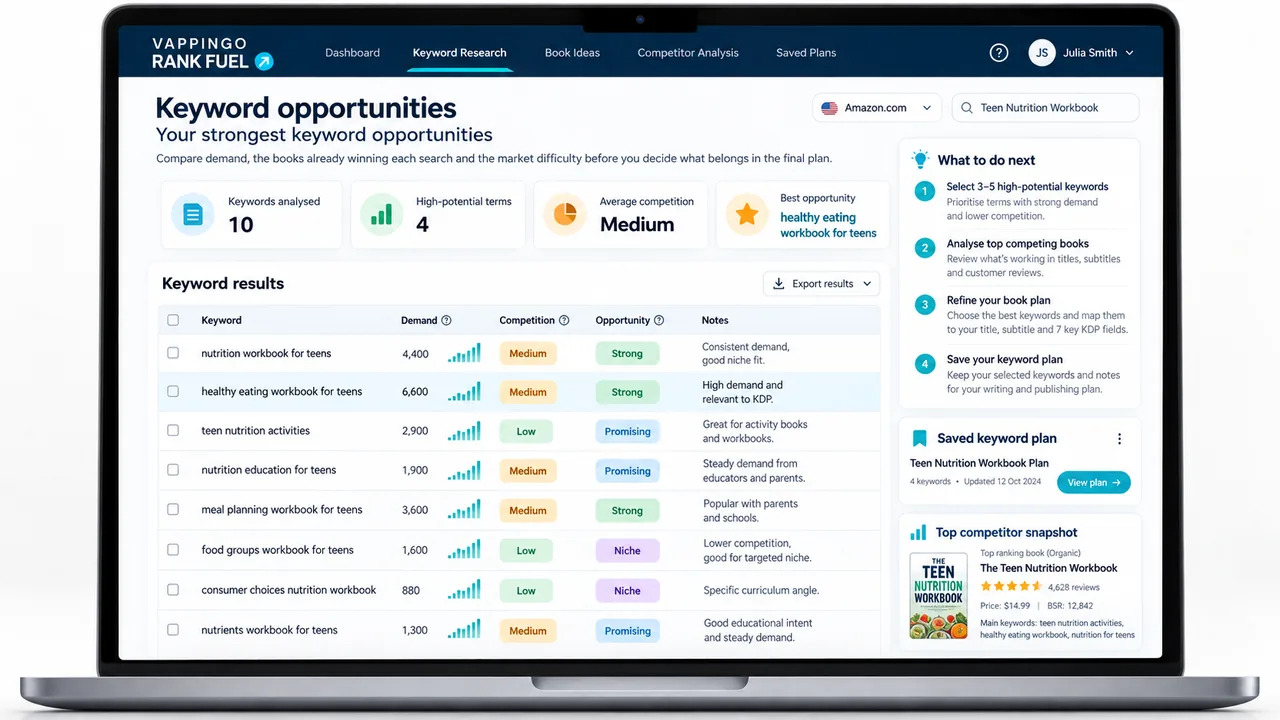
| Keyword Research | Find relevant Amazon.com buyer searches and compare demand with the strength of the market. |
| Book Keyword Spy | Investigate search territory already bringing visibility to competing books without copying prohibited metadata. |
| Keyword Gap Finder | Find relevant search opportunities competitors cover and your book currently misses. |
| Keyword Rank Tracker | Track ranking movement after you change backend keywords. |
| Listing Audit | Check whether the keyword strategy is reasonable but the listing fails to convert the traffic. |
Frequently Asked Questions About the 7 KDP Keyword Boxes
What should I put in my 7 KDP keyword boxes?
Use relevant reader search language that accurately describes the book. Preserve important phrases in a natural order, then use additional space for closely related words that support other genuine searches. You do not need to force one exact search phrase into each field or pad all seven boxes simply because they are available.
Am I wasting space if I repeat my title in the keyword boxes?
Not automatically. Amazon advises against unnecessary repetition of information already covered elsewhere, so repeating the same title phrase across several fields is usually inefficient. But a repeated word can still belong in a genuine customer search phrase. Treat duplication as a space-efficiency issue, not a rule that the same word must never appear twice.
Should I use single words or phrases in KDP keyword boxes?
Natural short phrases are usually more useful because they preserve meaning and buyer intent. KDP advises logical word order and warns against quotation marks. A field can also contain closely related words beyond the core phrase, but do not assume Amazon will index every arbitrary combination of those words.
Should I use competitor names in my KDP keyword boxes?
Be careful. Competitor research can help you understand the market, but your keyword choices should accurately match your own book and comply with KDP rules. Focus on buyer-relevant phrases that describe your book, audience, format, and use case.
How often should I change my KDP keyword boxes?
Do not change them constantly without tracking. Make focused updates, record what changed, and monitor impressions, clicks, sales, ad performance, and keyword ranking movement over time. Random changes make it harder to know what helped.
Why are my KDP keyword boxes full but my book still has no sales?
Your keyword boxes may be full but still weak if the phrases are too broad, too vague, too competitive, duplicated, or poorly matched to buyer intent. It is also possible that the keywords are bringing visibility but the listing is not converting that traffic.
What is the fastest way to improve my KDP keyword boxes?
Start by identifying the real customer searches you want the backend to support. Preserve the strongest phrases in natural order, remove padding and needless duplication, then use remaining space for closely related language that adds genuine coverage. Finally, track whether visibility changes after the update.
Do I need to fill all seven KDP keyword boxes?
Amazon does not require every field to be full, but Rank Fuel’s optimization strategy is to use the available keyword space efficiently. It targets near-full fields with relevant buyer-intent language rather than leaving useful capacity unused. The distinction is important: fill the space with relevant language, not padding.
Can words from different KDP keyword boxes support the same search?
Think of the seven fields as one metadata set rather than seven isolated exact-match slots. You can preserve important phrases in individual fields and distribute closely related language across the backend so the overall set is designed to support several relevant customer searches. Do not assume Amazon will index every arbitrary permutation of words across the boxes; use real target searches as the plan and verify what the book actually begins to rank for.
Final Thought: Seven Boxes Is Not Much Space, So Do Not Waste It
Your 7 KDP keyword boxes are not seven exact-match slots waiting for seven perfect phrases. They are a limited relevance signal that works best when the fields are planned together.
Preserve important search phrases in a natural order. Use additional space for closely related words that expand genuine buyer coverage. Remove padding and avoidable duplication, but do not break useful phrases merely to eliminate repeated words. And do not assume every possible permutation will be indexed simply because the words sit in the same field.
Not sure whether the keyword boxes or the listing are the problem? Run your KDP Listing Audit before you replace everything again.