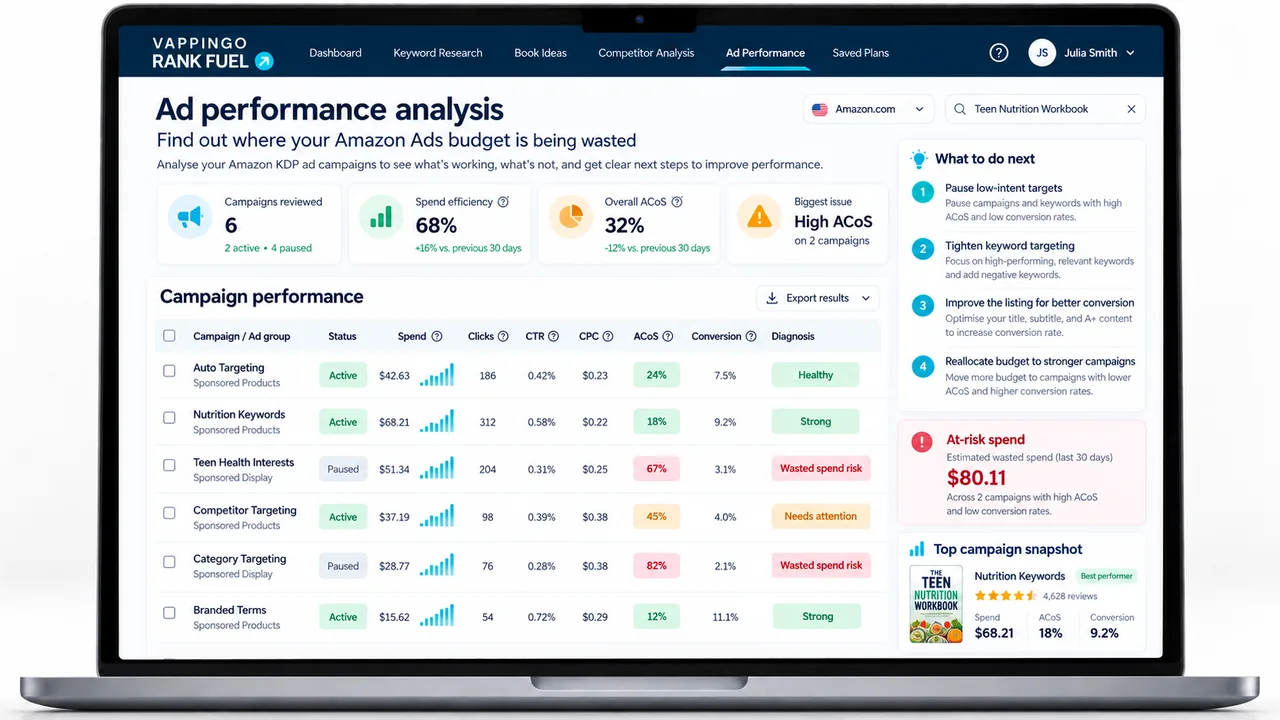
How to Optimize Amazon Ads for Books: A Weekly Evidence-Led System
Use a weekly Amazon Ads optimization system for books: search terms, negatives, bids, budgets, placements, ACoS, TACoS, and controlled scaling decisions.
Amazon Ads optimization is not a one-time task. It is a repeating weekly process that converts your ad spend into data, your data into decisions, and your decisions into progressively more efficient campaigns. Authors who launch and forget are paying for traffic that slowly degrades. Authors who run a disciplined weekly cycle are building a compounding advantage their competitors cannot catch up with. This guide covers the full optimization workflow, what to check, what to change, when to change it, and how to avoid the common mistakes that turn a profitable campaign into a money drain.
Why Most Authors Never Properly Optimize
There are two main reasons Amazon Ads accounts decay rather than improve over time. The first is that authors treat campaign launch as the finish line. They spend considerable effort setting up targeting, writing ad copy, and configuring bids, then check in weekly only to glance at spend and sales without making structured decisions. The account stagnates or slowly worsens as irrelevant searches accumulate unchecked. The second reason is that authors lack a framework. The Amazon Ads console surfaces an overwhelming amount of data, impressions, clicks, spend, sales, ACoS, Search Term Reports, and without a clear order of operations, most of it becomes noise. Optimization without a framework produces random, inconsistent changes that are just as likely to harm performance as improve it. The solution is a weekly routine that takes roughly 30-45 minutes per book, follows a defined sequence, and makes decisions based on thresholds rather than intuition. After four to six weeks of consistent execution, almost every book’s advertising improves materially. After twelve weeks, the gap between an optimized account and an unoptimized one is typically measured in multiples, not percentages.
The Metrics That Matter and What They Tell You
tell you whether your ads are entering auctions. Very low impressions (under 500 per week for a new campaign) suggest bids are too low, targeting is too narrow, or metadata quality is limiting automatic campaign reach. Impressions alone tell you nothing about campaign quality, a campaign can have millions of impressions and be losing money at scale.
measures how often someone who sees your ad clicks it. For books, a CTR of 0.3-0.6% is typical. Below 0.2% consistently suggests your ad creative (primarily your cover thumbnail and title as they appear in search results) is not compelling enough. Above 1.0% is excellent and usually indicates strong keyword relevance combined with an appealing cover. CTR is a cover and relevance signal, not a profitability signal, you can have a high CTR on irrelevant keywords and be losing money rapidly.
measures how often a click becomes a sale. Book conversion rates vary enormously by genre, price, and review count. A book with 100+ reviews and a competitive price point in a high-intent genre might convert at 10-15%. A new book with few reviews might convert at 3-5%. What matters most is tracking your own book’s conversion rate as a baseline and watching for changes, a sudden drop in conversion often signals a price change, review decline, or listing issue rather than an advertising problem.
is the core efficiency metric: ad spend divided by ad revenue, expressed as a percentage. An ACoS of 35% means you spent £0.35 in ads for every £1.00 in ad-attributed sales. Your target ACoS depends on your royalty margin, see the section below. ACoS tells you whether specific keywords, campaigns, or ad types are profitable, but it only counts sales Amazon attributes to that specific ad click.
divides ad spend by total revenue, including organic sales. This is the truer measure of advertising’s overall impact on your business. A book with a TACoS of 12% is in very healthy shape: ads are driving growth without consuming the organic sales base.
Setting the Right ACoS Target for Your Book
Before you can judge whether a keyword or campaign is performing well, you need a break-even ACoS. The formula is simple: break-even ACoS = (royalty ÷ list price) × 100. A £4.99 Kindle book earning a 70% royalty generates a royalty of approximately £3.49 after delivery costs (using Amazon’s standard £0.10/MB delivery fee as a rough guide). Break-even ACoS = (£3.49 ÷ £4.99) × 100 = approximately 70%. This means you can spend up to 70% of the sales price on ads before going into the red on ad-attributed sales. In practice, few authors target break-even, you want profitable ads, not break-even ads. A reasonable target ACoS for a direct-profit goal is 30-45% for most fiction and 20-35% for most nonfiction (where price points and royalties often differ). If you have a series, you may tolerate a higher ACoS on book one because readers who buy that book often go on to purchase the series, revenue your ad report never captures. Set your target ACoS before you start optimizing. It becomes the single threshold that determines whether a keyword is performing well (ACoS below target), marginally (at target), or poorly (above target). Without this number, all your optimization decisions are relative to nothing.
The Weekly Optimization Cycle
Start with account health and obvious waste: rejected ads, accidental bids, exhausted budgets on valuable campaigns, and clearly irrelevant search terms. Then review discovery evidence, target performance, placements, and changes in conversion or reader economics. End with a short change log.
A weekly cadence works well for many active accounts, but the amount of evidence matters more than the day of the week. High-spend campaigns can create actionable data quickly; low-volume books can need longer. Current author click attribution runs for 14 days, so recent clicks can still gain purchases or eligible KENP.
Make the smallest number of changes that solve the problems you can actually identify. The goal of optimization is not activity. It is to improve traffic quality, acquisition economics, and the clarity of the next decision.
Mining the Search Term Report
Use the Search term report to identify four groups: useful queries worth direct targeting, obvious mismatches worth excluding, plausible terms that need more evidence, and searches that reveal a product-page problem because they are relevant but repeatedly fail to convert. Do not require a fixed number of sales before a term can be promoted. One expensive nonfiction sale can be meaningful; two low-royalty orders can still be noise. Use relevance, CPC, attributed outcomes, and expected reader value together. Likewise, promotion to exact does not require negating the same term from the discovery campaign.
Remember that the report contains terms associated with clicks and can include inferred context for some non-search placements. It is a feedback loop for paid traffic, not a complete organic keyword report.
Adding Negative Keywords
Negative exact is the safer tool when one query is the problem. Negative phrase is broader and should be reserved for phrases you genuinely do not want anywhere in the matching search. Review the collateral effect before applying phrase negatives at campaign level.
Use obvious relevance mismatches early. For plausible traffic, compare spend and conversion evidence with the book’s economics and allow the 14-day author attribution window to mature when the decision is close. Amazon provides guidance around 20 clicks for evaluating negatives, but the cost of those clicks and the clarity of the mismatch still matter.
Audit old negatives when a book changes. A new sequel, format, audience, or pricing strategy can make a previous exclusion unnecessarily restrictive.
Adjusting Bids by Keyword Performance
Bid changes should answer a diagnosed problem. Raise a bid when a relevant target converts at an acceptable acquisition cost and appears bid constrained. Lower it when the traffic is relevant but the CPC pushes acquisition beyond the level the book can support. Pause when continued spend has little plausible path to recovery or the target is simply wrong.
Do not apply the same percentage move to every target. A small change is useful when you want to preserve traffic and observe the response; a larger move can be justified when the target is far outside the acceptable economics. Document the old bid, new bid, and reason.
Check placement controls before blaming the target bid alone. A large top-of-search modifier or dynamic up-and-down strategy can change actual CPC even when the base keyword bid looks reasonable.
When to Pause Keywords vs Lower Bids
Lower a bid when the target is relevant and still worth testing but the current CPC is too high for the conversion it produces. A lower bid trades some delivery for a better acquisition-cost opportunity. Pause when the relevance is weak, the economics are persistently poor, or you no longer need the target for discovery.
Do not make “20 clicks and no sale” an automatic pause rule. Amazon uses 20-click guidance in negative-targeting advice, but your decision also depends on CPC, royalty, reader value, and attribution maturity. A clearly irrelevant query can be stopped sooner; a cheap, highly relevant target can deserve more evidence.
Preserve decision history in your change log even if the platform keeps the target history for a paused item. The useful record is not only that you paused it, but why.
Keeping Campaign Structure Clean
Over time, campaigns accumulate keywords, ad groups, and negatives. A clean structure makes optimization faster and prevents inter-campaign keyword cannibalisation (where your own campaigns compete against each other in auctions, driving up your costs). Standard structure for a single book: one automatic campaign (all four sub-types running) generating discovery data; one manual exact match campaign running your proven converters; one manual broad/phrase campaign for mid-funnel exploration; optionally one Sponsored Brands campaign once you have three or more titles. Keep each purpose in a separate campaign, do not mix automatic and manual targeting in the same campaign. If you are running multiple campaigns for the same book, add the book’s keywords as negative exact matches in the automatic campaign to prevent it from competing with your manual campaign on the same proven terms. This forces Amazon’s automatic system to keep exploring new search territory rather than repeatedly winning auctions for terms your manual campaign already owns efficiently.
Using Placement Bid Modifiers
Amazon Ads allows you to increase your bid by a percentage for three specific placement types: Top of Search (first row of results), Rest of Search (below the fold), and Product Pages (on ASIN detail pages). This is separate from your keyword bid, it is a multiplier on top of it. To check whether a placement modifier is worth using, look at your Placement Report (Reports → Campaign Placement Report). If Top of Search shows a dramatically better conversion rate than Rest of Search or Product Pages, increasing your bid modifier for Top of Search, even by 25-50%, can concentrate more of your budget on the placement that converts best. If there is no meaningful difference, modifiers add complexity without benefit. A common pattern: books with strong covers and clear genre signals often convert better at Top of Search because readers in active search mode self-select. Books with weak review counts sometimes convert better on Product Pages because readers encountering them while browsing a competitor’s also-bought section are in a more exploratory mindset. Check your own data before applying blanket modifiers.
Budget and Dayparting Considerations
Amazon now supports schedule bid rules for Sponsored Products, which can raise bids at selected times or around events. Treat scheduling as an advanced test after the campaign has enough time-based evidence. It is easy to confuse normal day-to-day noise with a durable hourly pattern, so document the schedule change and compare it with an appropriate baseline.
Reading Campaign Reports Correctly
Use date windows that respect the 14-day author attribution period. Very recent clicks can still gain attributed purchases or KENP, so a weekly routine should separate obvious relevance fixes from borderline profitability decisions that need more mature data.
Integrating ACoS and TACoS
ACoS only counts sales Amazon directly attributes to ad clicks. TACoS (total ad spend ÷ total revenue) incorporates organic sales, which are often lifted by advertising even when Amazon cannot directly attribute them. A well-run ad campaign typically raises a book’s BSR, which increases organic visibility, which drives organic sales, a flywheel effect that ACoS reporting completely misses. If your ACoS is above your target but your TACoS is healthy (typically below 20% for most books), your ads are working at a business level even if the direct attribution looks marginal. Conversely, a good ACoS alongside a poor TACoS can indicate that ads are cannibalising organic sales rather than genuinely growing revenue. Track both, and optimize for TACoS as the primary measure of overall advertising health. See our dedicated for the full calculation and benchmarks.
Tools That Speed Up Optimization
Spreadsheets and the Amazon Ads console remain enough to run a disciplined account, but tools can reduce the mechanical work. KDP Rank Fuel’s current Amazon Ads Generator creates a guided five-campaign Sponsored Products plan, and Amazon Ads Weekly Coach is designed to turn exported ad reports into clearer recurring decisions. Keyword Research, Book Keyword Spy, and Competitor Discovery can add buyer-search and comparable-book evidence.
Use those tools as decision support rather than as a source of guaranteed bids, profit scores, or automatic campaign changes. The live Amazon Ads console is the authority on eligibility, controls, suggested bids, and final settings. Exported reports are the evidence for what happened.
The most valuable operating tool is still a repeatable review habit with a change log. Faster analysis only helps if the decisions remain interpretable.
The Weekly Optimization Order
First, protect the account from obvious waste. Check broken eligibility, runaway spend, and clearly irrelevant search terms. Second, protect useful traffic. Identify proven targets that are running out of budget or losing delivery. Third, improve control. Promote repeat search-term evidence, add precise negatives, and separate campaigns when the current structure prevents a clean decision. Fourth, change bids or budgets. Only after you understand why the campaign is behaving as it is should you move the financial levers.
Finally, write down what changed. A weekly routine without a change log encourages contradictory adjustments: lower a bid one week, raise it the next, add a negative, forget why impressions fell, then rebuild the campaign. A short note containing date, target, action, reason, and expected result turns optimization into an experiment instead of a memory test.
A useful review also asks what should not change. If a target is relevant, receiving modest traffic, and still inside the attribution window, leaving it alone can be the best decision. If a campaign is profitable but not budget constrained, raising the budget does nothing. If the product page has just changed, preserving the ad structure for a period gives the new page a cleaner test. Deliberate inaction is part of optimization because it protects the baseline you need to interpret later results.
For larger accounts, separate the weekly operational review from a deeper monthly business review. The weekly pass handles search terms, bids, budgets, eligibility, and obvious waste. The monthly pass compares placement trends, TACoS, total KDP performance, series value, pricing changes, and whether the campaign structure still matches the role of each book. This keeps small campaign decisions from crowding out the bigger question: whether advertising is making the publishing business stronger.
Keep a compact optimization worksheet beside the change log. Useful columns include review date, campaign, target or search term, recent spend, mature spend, clicks, attributed orders or eligible KENP, CPC, ACoS where meaningful, placement context, action taken, reason, and next review date. The point is not to build another dashboard. It is to separate the date the platform recorded activity from the date you made a decision, so you can tell whether a later result followed the change or merely happened before it. That small discipline is especially valuable when several people manage the account or when you return to a campaign after a quiet month.
Turn the article into a repeatable Amazon Ads workflow
KDP Rank Fuel’s current Amazon Ads Generator builds a guided five-campaign Sponsored Products plan, while Amazon Ads Weekly Coach helps turn exported reports into clearer recurring decisions. Use the tools as decision support and keep the live Amazon Ads console as the authority on eligibility, settings, and final changes.
A Worked Decision Example
Imagine you are applying this guide to one live title rather than the whole catalog. Write down the campaign objective, the advertised format, the royalty from one conversion, the current average CPC, and the exact evidence you want the next test to produce. For optimize amazon ads books, this creates a baseline you can compare with the next reporting period instead of relying on a generic benchmark.
Next, choose one variable to test. That might be a new exact target, a product-target group, a lower bid on an expensive but relevant term, a higher budget on a campaign that is genuinely capped, or a detail-page change made before the next traffic test. Record the date and the reason. Keep the other major variables stable long enough to make the result interpretable.
When the new period has enough traffic, compare relevance, CPC, conversion, attributed outcomes, total sales context, and any KU or series value that genuinely applies. The goal is not to prove that one change caused every movement in the account. It is to make the next decision with better evidence than the previous one. That approach preserves useful learning even when the campaign itself is not yet profitable.
Frequently Asked Questions
What should I optimize first?
Start with obvious mismatch and budget waste, then review search terms, target performance, placements, bids, and conversion context. Do not change everything at once.
How often should I review Amazon Ads?
A weekly operational check with deeper two-week or monthly comparisons works for many authors, but cadence should reflect spend and traffic volume.
Should I pause after a fixed number of clicks?
No. Use spend, relevance, conversion evidence, and expected reader value. A universal click threshold ignores the cost of each click.
Can I schedule bids by time of day?
Amazon supports schedule bid rules for Sponsored Products. Use them only when your account has enough time-based evidence to justify the extra complexity.
How does Rank Fuel Weekly Coach fit?
It can turn exported ad reports into a structured weekly decision workflow. The live Amazon Ads console remains the authority for available controls and final campaign changes.
Optimization Is Controlled Learning
The best weekly routine is boring in the right way: fix obvious waste, protect useful traffic, make one interpretable change, and write it down. That discipline compounds faster than constant bid tinkering.