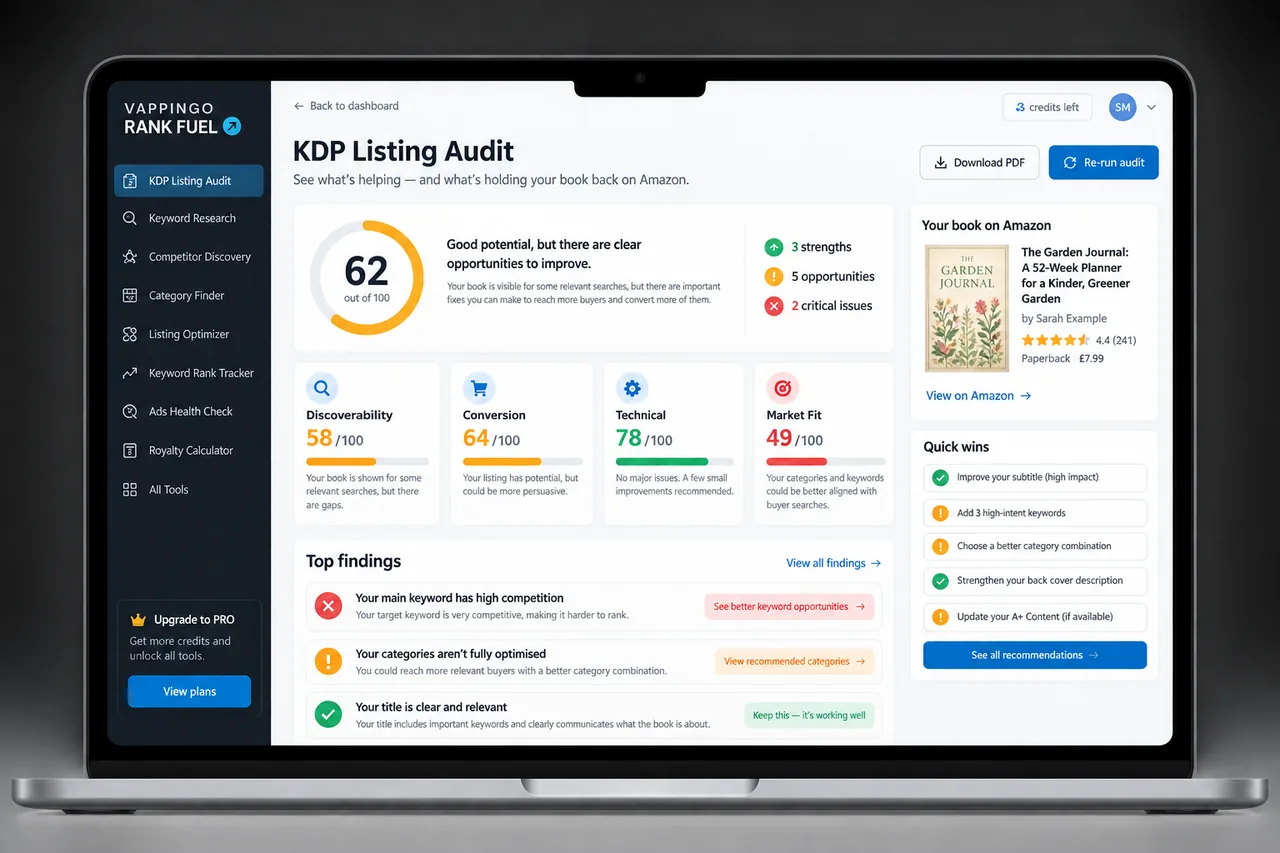
Amazon Book Sales Page Optimization: A Complete KDP Conversion Audit
Audit the Amazon book detail page from thumbnail to A+ Content. Improve the elements authors can control and diagnose whether weak sales come from traffic, positioning, or conversion.
An Amazon book detail page is where discovery becomes a buying decision. The page combines author-controlled assets such as cover, description, price, and A+ Content with Amazon-controlled elements such as merchandising, format display, recommendations, and customer reviews.
A useful audit separates those layers. You cannot “optimize” customer reviews in the same way you rewrite a description, and you should not treat every sales problem as a keyword problem. Start by asking whether the right shoppers are arriving, then whether the page makes the book easy to understand and trust.
1. Cover and Thumbnail Fit
The cover has to work as a small search-result thumbnail before it works as a full-size design. Check whether genre, tone, title readability, author name, and professional finish are legible at the size shoppers actually see. Compare against current successful books in the same reader market, not against unrelated designs you personally like.
If a cover is beautiful but signals the wrong genre, better description copy will struggle to compensate. Treat cover fit as a positioning issue as well as a design issue.
2. Title, Subtitle, and Core Positioning
The title and subtitle should tell the truth about the book and help the right reader recognize relevance. Avoid stuffing keywords into metadata at the expense of readability or policy compliance. For published books, KDP restricts changes to title and subtitle, so a live-listing optimization plan should generally work with the locked fields unless you are creating a legitimate new edition.
Use the description and other editable fields to sharpen positioning without promising a different book. A clear promise attracts fewer wrong clicks and gives the right shopper a faster reason to continue.
3. Description and First-Screen Copy
The description should earn the next few seconds of attention. For fiction, lead with stakes, character, tension, and genre promise rather than a plot synopsis. For nonfiction, identify the reader’s problem, the outcome, and the book’s approach. Use short readable blocks and formatting that survives Amazon’s current description rules.
If the description needs a systematic review, Rank Fuel’s Listing Audit and Listing Optimizer are designed around current live-listing constraints. The Optimizer can preserve important keyword intentions while improving weaker areas of a published listing.
4. Price and Format Choice
Price changes the buying decision and the royalty economics at the same time. Compare current books in the same format and market, then test only when you have enough stable traffic to learn from the result. On Amazon.com, KDP’s 70% ebook royalty option now supports qualifying prices from $2.99 to $12.99, following the July 2026 price-band change.
Do not infer a universal “best” price from another book. Use the KDP price-testing guide to isolate price as a variable rather than changing it alongside the cover, ads, and description.
5. Reviews and Reader Trust
Customer reviews are social proof and product feedback, but they are not an author-controlled copy block. Follow Amazon’s review policies and never condition compensation, gifts, or ARC access on a positive review. Read review themes for product insight: repeated confusion about tone, formatting, pacing, or promise can reveal a mismatch between the listing and the book.
Editorial Reviews are different. Amazon Author Central currently lets authors add Editorial Reviews in the US marketplace, which can be useful for legitimate professional endorsements.
Negative reviews are not always a conversion problem to “solve.” Some simply show that the wrong reader bought the book, which can be a positioning lesson. Others reveal a real product issue such as formatting defects or an inaccurate promise. Sort criticism into expectation mismatch, subjective taste, and correctable defect. Only the last two categories that point to something you can genuinely improve should drive product changes.
6. Read Sample and Interior Quality
Amazon’s Read Sample feature lets shoppers inspect part of the book before buying. That makes front matter, opening pages, typography, formatting, and early writing quality part of the sales page even though they are technically inside the book file. Make sure the opening reflects the promise created by the cover and description.
Do not pad the front of an ebook with unnecessary material that delays the sample’s useful content. If the manuscript or sample still contains language errors, fix the product rather than trying to compensate with more marketing.
7. Author Central and A+ Content
Claim the book in Amazon Author Central so the author page, biography, followers, book list, and eligible Editorial Reviews are maintained. A+ Content is managed through KDP Marketing, not Author Central, and appears lower on the detail page under “From the Publisher.”
Use A+ Content after the main page is strong. Series comparisons, author background, visual explanations, and interior context can help reduce uncertainty, but they should reinforce rather than duplicate the description.
8. Mobile Audit and Full-Page Checklist
Open the live page on a phone and follow the same route a shopper does. Is the cover legible? Is the proposition understandable before a long scroll? Are the most important claims buried? Do the available formats and price make sense? Does the sample reassure the reader? Dynamic Amazon layouts vary, so audit the experience rather than relying on a fixed desktop screenshot.
Then classify the problem: traffic, relevance, or conversion. If the book barely appears for relevant searches, work on discovery. If it gets clicks from the right shoppers but weak sales, work on the page and product. If it converts but volume is low, scale the traffic sources that are economically sensible.
A useful diagnosis table has three columns: evidence, likely problem, next test. For example, relevant search impressions with few clicks suggest thumbnail or positioning friction; strong clicks with weak purchases suggest price, description, sample, reviews, or reader mismatch; strong purchase conversion with low volume suggests a traffic problem rather than a page rewrite. Keep the classification provisional and look for more than one signal before making a major change.
Frequently Asked Questions
What is the first thing to optimize on an Amazon book page?
Start with reader fit and the first-screen elements, especially cover, title positioning, price, rating context, and the opening of the description.
Can I change a KDP title or subtitle after publication?
KDP restricts changes to key identity metadata after publication. Live-listing optimization normally focuses on editable fields unless a legitimate new edition is required.
Can authors control customer reviews?
No. Authors can improve the product and invite compliant honest feedback, but customer reviews are independent reader content.
Is A+ Content part of Author Central?
No. KDP authors create A+ Content through the KDP Marketing page and A+ Content Manager.
How do I know whether I have a traffic problem or a conversion problem?
Compare relevant impressions or clicks with purchases. Low qualified traffic suggests discovery work; healthy qualified traffic with weak purchases points toward the product page or book offer.
What to Do Next
Audit the page in order of customer exposure, then change one high-impact problem at a time. Keep a dated baseline so you can tell whether a new cover, description, price, or keyword plan actually improved the book rather than merely coinciding with a temporary sales change.
Rank Fuel’s Listing Audit identifies technical, discoverability, and conversion-copy issues, while Listing Optimizer helps improve a published listing without pretending locked fields can simply be rewritten.