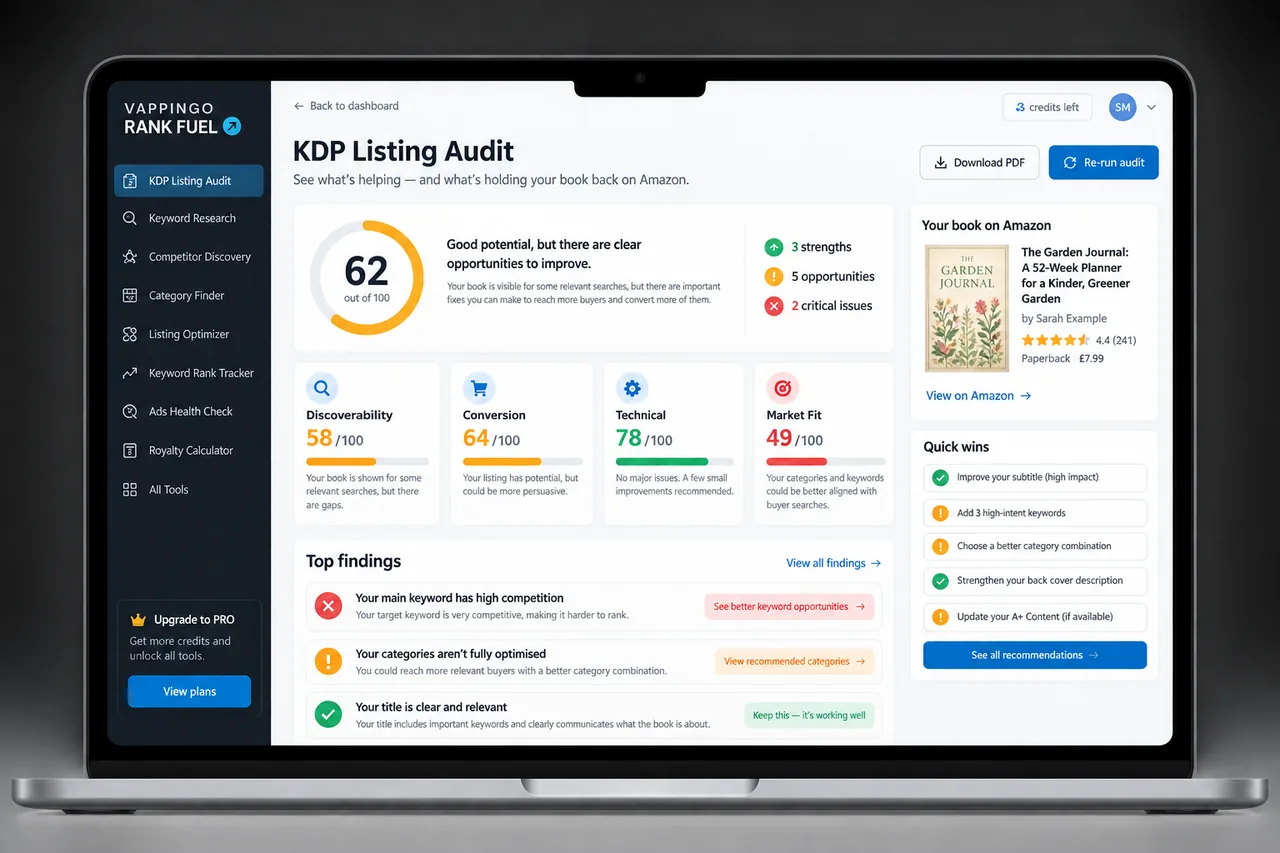
KDP Listing Audit: Find What to Fix on Your Amazon Book Listing
Audit an Amazon book listing for technical, discoverability, and conversion-copy issues, then prioritize the fixes that matter most.
Before you change a listing, you need to know what is wrong with it. Not in a general sense , “the description could be better” , but specifically: which elements are costing you rankings, which are costing you conversions, and which are technically incorrect in ways that affect how Amazon’s systems process your listing.
Most publishers who sit down to improve an underperforming listing start with the description because it is the most visible element. Sometimes that is the right instinct. Often it is not. The description may be converting reasonably well, and the real problem is that keyword boxes are formatted incorrectly, wasting ranking potential on every single search Amazon tries to match against your listing. Or the description is strong but three of the seven backend keyword boxes are empty, leaving significant indexing potential untapped.
The
is the diagnostic step that happens before optimization. It identifies exactly what is wrong and exactly which layer it belongs to, so that the fix goes to the right place rather than the most visible one.
Three Layers, Four Tabs
A KDP listing has three distinct layers, each of which can fail independently. The Audit evaluates all three and presents the results across four tabs.
The Technical Tab: What It Catches
The Technical view flags metadata patterns worth checking against current KDP guidance, including unsupported characters, repeated or vague keyword entries, and mismatches between the book and its listing. Treat a flag as a prompt to verify the relevant KDP rule rather than as proof that Amazon has silently reduced visibility.
The audit checks the listing. Proofreading checks the manuscript.
A listing that passes every audit check and scores 90 out of 100 is doing everything right at the listing layer. The layer beneath it , the manuscript readers receive after clicking buy , is a separate quality question entirely. Amazon’s algorithm evaluates conversion signals continuously, which means a well-audited listing pointing to a book with editing problems will see its conversion rate and rankings erode as reviews accumulate. Vappingo’s professional manuscript proofreading service works at the layer the Listing Audit cannot reach.
The Discoverability View: Relevance Without “Amazon search” Myths
Amazon publishes practical guidance on accurate metadata and relevant keywords, but it does not publish the complete formula used to order book search results. For that reason, the Audit should not present unofficial “Amazon search” checklists as if they were confirmed ranking factors.
The discoverability view focuses on things you can inspect: whether the language accurately reflects the book, whether important buyer phrases are missing, whether keyword choices are too vague or repetitive, and whether the listing creates a coherent match between the searcher, the promise, and the book. These are useful publishing questions even when Amazon’s exact weighting remains private.
The Conversion Tab: Scoring the Human Response
The Conversion tab is where the Audit evaluates your listing from the reader’s perspective rather than the algorithm’s. It scores five elements: Read the surrounding findings together so you fix the underlying listing problem rather than chasing the score itself.
Understanding the Audit Score
The score is a Rank Fuel diagnostic, not an Amazon metric. Its purpose is to make a messy listing easier to prioritize by separating clear technical issues from discoverability weaknesses and conversion-copy problems.
Use the total to orient yourself, then read the flagged items. A listing with one serious metadata problem may deserve faster attention than a listing with several minor copy improvements even if the totals look similar. The most useful output is the ordered fix list, not the number by itself.
The full Listing Audit requires Starter access. For the rules behind keyword and metadata checks, use Amazon’s KDP keyword guidance as the authoritative reference; Rank Fuel’s score is a diagnostic layer for prioritizing what to fix.
Running the Audit: What You Need
Frequently Asked Questions
Is the Listing Audit score an Amazon score?
No. It is Rank Fuel’s diagnostic framework for comparing issues consistently. Amazon does not publish a 100-point book-listing score.
Does Amazon publish an “A10” book-ranking checklist?
No. Amazon publishes metadata and keyword guidance, but not the complete search-ranking formula.
How many KDP keywords can I add?
KDP currently allows up to seven keywords for a title.
Can I update keywords after publication?
Yes. KDP allows updates to description, keywords, categories, territories, and price for live books, subject to review.
What should I fix first?
Start with clear technical or metadata problems, then address discoverability gaps and buyer-facing copy.
What to Do Next
Run the Listing Audit before a large revision and use the findings to prioritize the work. The score is useful for orientation, but the flagged issues and the order in which you address them matter more than the number itself.
Continue in KDP Rank Fuel
Open the tool from your book workspace so the next action stays connected to the same title and evidence.