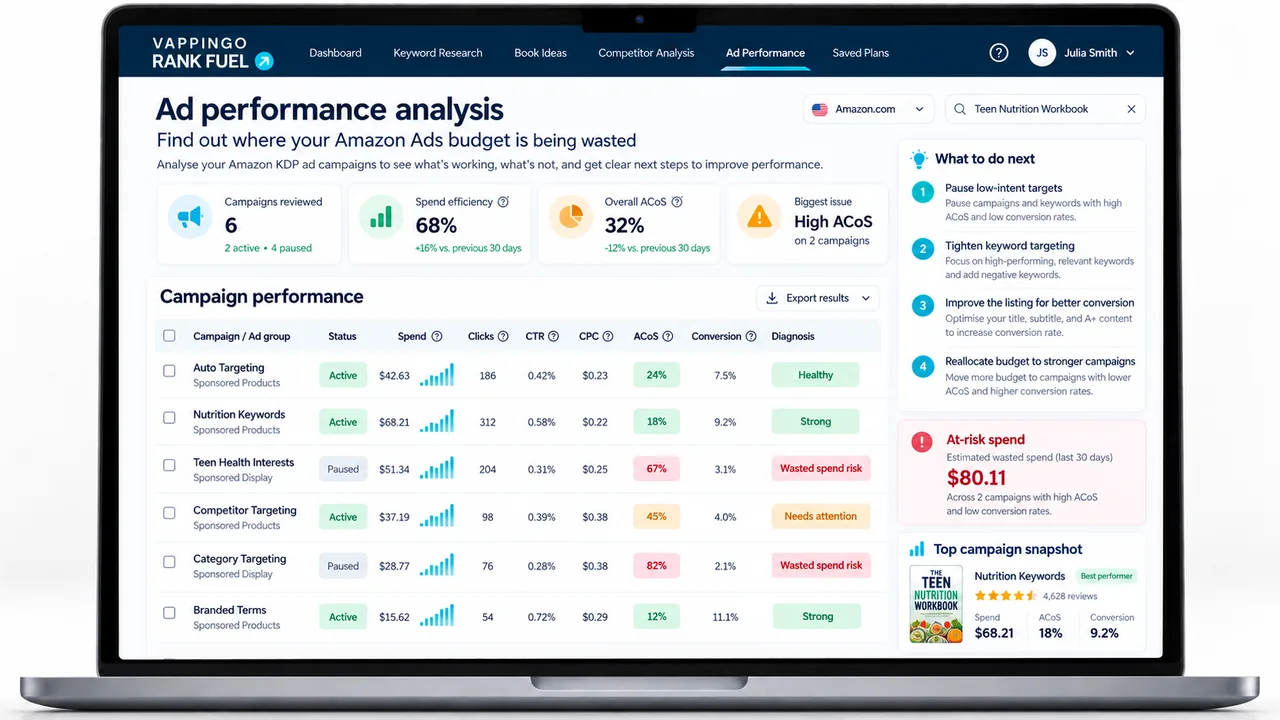
Amazon Ads Weekly Coach for KDP: Turn Reports Into a Clear Action Plan
Upload Amazon Ads Search Term, Keyword, and Campaign reports and use Rank Fuel to prioritize negatives, bids, scaling opportunities, and campaign-level decisions.
Amazon Ads produces data every week. The problem is that most of it looks like noise until you know what to look for: and by the time most publishers figure out what to look for, they have spent months making changes that felt productive but were not connected to anything systematic.
I built the Weekly Coach after observing the same pattern across dozens of publisher ad accounts. The campaigns were running. The reports were being downloaded. But the gap between “I downloaded the report” and “I made a change that actually improved performance” was filled with uncertainty. Publishers would negate a term that had three clicks and no sales, scale a keyword because it had a low ACOS on two conversions, or leave a campaign untouched because the data looked too messy to interpret confidently.
None of those are bad instincts. They are just the instincts of someone trying to analyze a system without a framework for what good looks like. The Weekly Coach provides the framework. You upload the reports, it produces the action plan, you execute the actions. Same process every week, building on the week before.
The Three Reports You Need
Amazon Ads generates more reports than most publishers know exist. The Weekly Coach uses three of them: the three that contain the information that actually drives weekly decisions.
To download all three: go to your Amazon Ads account, click Reports in the left menu, create a new report for each type with a date range of the last seven to fourteen days, and download the CSV files. The process takes under five minutes once you have done it once. The Weekly Coach accepts all three files simultaneously.
The Six-Screen Workflow
The tool walks you through six screens in sequence. The order reflects how the analysis builds: each screen uses the output of the previous one to add context.
When a Campaign Is Budget-Constrained
A campaign can be efficient and still be limited by its daily budget. The useful question is whether the campaign is repeatedly exhausting budget while producing results that fit your profitability target. If so, budget may be constraining a proven campaign; if not, increasing it can simply increase inefficient spend.
The Weekly Coach surfaces this as a decision for review rather than treating one internal decision rule as an Amazon rule. Use your royalty, target economics, campaign history, and the strength of the sample before changing budget.
This deserves more space than a bullet point, because it is the single insight from the Weekly Coach that surprises publishers most consistently. When a campaign hits its daily budget cap, Amazon stops showing your ads for the rest of the day. The campaign does not slow down gradually: it stops. And it typically stops in the early to mid-afternoon, which means your ads are absent during the evening hours that consistently produce the highest conversion rates in book advertising.
The symptoms of a capped campaign are easy to misread. The campaign appears to be performing well: it is spending its full daily budget, it has a reasonable ACOS, it is generating sales. What is hidden is the counterfactual: how many more sales would it have generated if it had continued running through the peak evening hours? The Campaign Health screen shows you the impression share data that answers this question: how often your ads were eligible to show versus how often they actually did: and flags campaigns where that gap is large enough to warrant a budget increase.
The fix is straightforward once identified: increase the daily budget on the capped campaign until it stops hitting the cap, then monitor ACOS for two weeks to confirm the additional spend is producing proportional returns. Most publishers who make this change after the Weekly Coach flags it see an immediate increase in daily sales with no change to ACOS: because the additional impressions are happening in the highest-converting time windows, not in the low-converting early morning hours where uncapped campaigns tend to exhaust their budget.
What Good Weekly Ad Management Actually Looks Like
The Weekly Coach is designed to be used in under thirty minutes once a week. Here is what a well-run weekly session looks like in practice.
Download your three reports on the same day each week: Monday morning works well because it captures a complete week of data with minimal weekend distortion. Upload them to the Coach. Review the Weekly Plan on Screen 3 and work through the high-priority actions in order. On Screen 4, look specifically for any search terms that have accumulated five or more clicks with no sales over the last fourteen days: these are your most urgent negation candidates regardless of whether the tool has flagged them as highest priority. On Screen 5, check whether any campaigns are showing a budget cap warning. Make the changes in your Amazon Ads account. Note the actions in the History screen. Close the tool.
The entire process takes between fifteen and thirty minutes for a publisher running two to three active campaigns on one or two books. For a publisher running more campaigns across a larger catalog, the tool’s prioritisation becomes more valuable: it ensures you spend your limited weekly management time on the changes most likely to move the numbers rather than the changes that feel most urgent.
According to
Written Word Media’s author advertising research
, the publishers who sustain the best ad performance over time are not necessarily those who spend the most time on their accounts: they are those who make changes systematically rather than reactively. The Weekly Coach is the system that makes systematic management possible without requiring an advertising background to run it.
What the Weekly Coach Does Not Do
It does not build your campaigns. If you are starting from scratch, use the
first. The Weekly Coach analyses campaigns that are already running: it has nothing to work with if there are no reports to upload.
It does not make decisions for you. The action plan tells you what to do and why. The final decision on whether to negate a term, increase a bid, or uncap a campaign is yours. The tool provides the framework and the data interpretation. You apply the judgement about your specific book, your current launch phase, and your broader marketing goals.
It does not fix a listing problem. If your campaigns are generating clicks but very few sales, and the issue is not a capped campaign or a targeting problem, the issue is your listing conversion rate. No amount of bid adjustment fixes a listing that does not convert. Pause the Weekly Coach session, run the
, fix the listing score, and then return to your ad management. Ads that are working hard to send traffic to a listing that does not convert are an expensive way to confirm a problem you already had.
Ads accelerate the reader experience: including the bad parts
When Amazon Ads are working well, they bring more readers to your book faster. When the book has writing quality issues: editing problems, typos, structural weaknesses: those issues reach more readers faster too. Every negative review generated by a reader who found the book through an ad costs you ranking and conversion rate. Vappingo’s professional manuscript proofreading service ensures the book your ads are promoting is the book readers expected to find. That is the foundation your Weekly Coach sessions are building on.
How It Connects to the Rest of the Suite
The Weekly Coach does not exist in isolation. Its outputs connect to other tools in ways that compound over time. Search terms that the Coach identifies as consistently converting at good ACOS are candidates for the
. If a search term is driving paid sales, it is worth knowing whether your book also ranks organically for it: and if not, whether a listing update could earn that organic position and reduce your paid dependency on it. The relationship between paid and organic rankings is one of the most underexplored areas of KDP advertising, and tracking both simultaneously shows you the full picture of where your visibility is coming from.
Campaign Health data from Screen 5 feeds into launch decisions. If you are planning a new book in the same category, the ACOS profile of your existing campaigns tells you the realistic cost of advertising in that space before you publish. A category where your break-even ACOS is consistently achievable is a fundamentally different business case from one where it is not. You can read more about launch velocity in the Amazon search era and how ad-supported launches interact with organic ranking for context on this.
The tool’s History screen also provides something that most publishers never have: a documented record of what they changed and when, and a way to correlate those changes with performance shifts. When sales increase two weeks after a bid adjustment, the History screen shows whether the two events are connected. When performance declines unexpectedly, the History screen shows whether any recent changes could have contributed. This audit trail is the difference between managing by evidence and managing by assumption. For the full picture on how the advertising tools fit within the wider platform, see the
. For additional context on Amazon Ads strategy beyond what any single tool can provide,
Kindlepreneur’s Amazon Ads resource library
is one of the most comprehensive independently maintained references available for KDP authors. The Weekly Coach is available on the Pro tier. Sign up at
: the free tier includes three credits so you can explore the platform before committing to a subscription.
Advertising Amazon Ads Campaign Builder for KDP: A Complete Five-Campaign Portfolio in Five Minutes |
Algorithm Launch Velocity in the Amazon search Era: The Sustained Strategy That Replaced the Spike |
Traffic External Traffic and Amazon Ranking: What the Data Shows |
Platform Review Is KDP Rank Fuel Worth It? A Full Platform Review |
Frequently Asked Questions
Which Amazon Ads reports does the Weekly Coach use?
The current workflow accepts Search Term, Keyword, and Campaign CSV reports and validates that the file contains the columns needed for the analysis.
Does the Weekly Coach change my Amazon Ads account automatically?
No. It produces a prioritized action plan for you to review and apply in Amazon Ads.
Why review ads weekly instead of daily?
A consistent weekly interval reduces overreaction to small samples and makes trend comparisons easier. High-spend campaigns can still require more frequent manual attention.
What kinds of actions can it surface?
The tool can identify candidates for negatives, exact-match promotion, bid changes, pauses, budget review, and watch-list treatment based on the uploaded performance evidence.
Can it guarantee a profitable ACoS?
No. Recommendations depend on the data and the targets you provide. Advertising performance remains sensitive to conversion, price, royalty, competition, seasonality, and Amazon auction dynamics.
What to Do Next
If rankings or listing conversion move after ad changes, track those signals against the same book rather than treating advertising as a separate system.
Connect ad decisions to the book itself
If rankings or listing conversion move after ad changes, track those signals against the same book rather than treating advertising as a separate system.